> ## Documentation Index
> Fetch the complete documentation index at: https://zovi.mintlify.site/llms.txt
> Use this file to discover all available pages before exploring further.
# Memberships
> Create recurring membership plans with member discounts and included treatments, and manage your subscribers and billing.
Memberships are recurring plans your clients subscribe to for a monthly fee. In
return, members get automatic discounts, free product or treatment credits, and
bonus loyalty points. This page is where you design plans and manage everyone
who's subscribed.
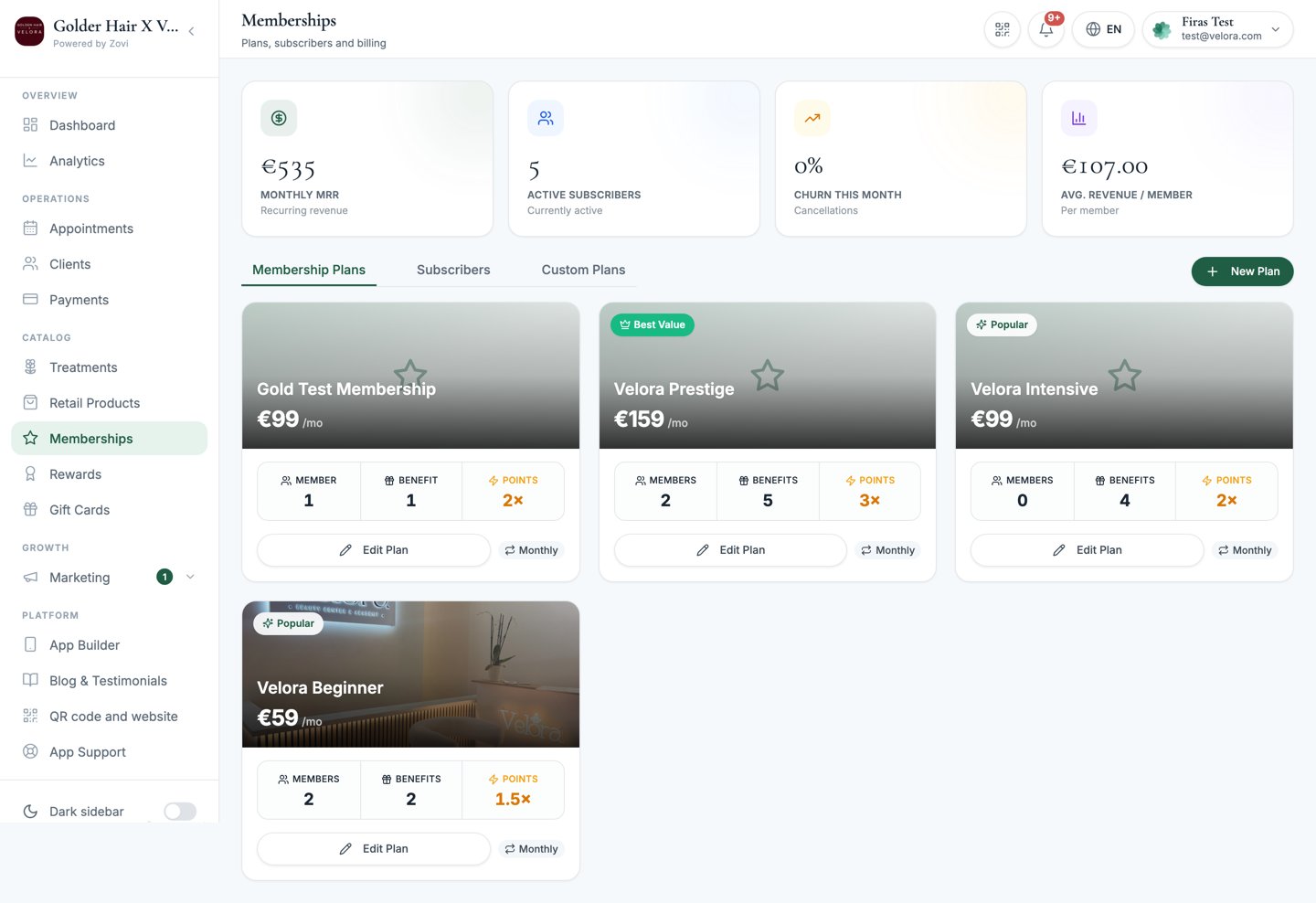
Open **Memberships** from the **Catalog** section of the sidebar
(the page subtitle reads *"Plans, subscribers and billing"*).
Clients subscribe to plans themselves, in the app. From the dashboard you
**create and edit plans** and **manage, pause, or cancel** existing
subscribers. You don't enrol clients here.
## Membership KPIs
A strip at the top of the page tracks how your membership base is performing:
| Metric | What it shows |
| ---------------------- | ----------------------------------------------------------- |
| **Monthly MRR** | Total recurring monthly revenue from all active members. |
| **Active subscribers** | How many clients currently hold a plan. |
| **Churn this month** | The share of members who cancelled. It turns red above 10%. |
| **Avg revenue/member** | Average monthly value per subscriber. |
## Tabs
The page has three tabs:
* **Membership Plans**: the plans you offer.
* **Subscribers**: everyone currently or recently subscribed.
* **Custom Plans**: one-off, client-specific bundles. See [Custom plans](/clients/custom-plans).
 ## Create a membership plan
On the **Membership Plans** tab, select **New Plan**. The dialog shows a live
phone preview on the right (*"Configure how this plan appears in the client
app"*) and is split into four sections.
Name the plan, set its monthly price, pick a **Plan type**, and choose how
it's presented.
Define the discounts members get automatically.
Grant free credits members can claim each period. This section only appears
on a **Free products** plan.
Give clients a one-time gift for joining the plan.
Select **Create**. You'll see a *Plan created* confirmation. Editing an
existing plan uses the same dialog, with a **Save Plan** button and a
*Plan updated* confirmation.
### 1. The Basics
| Field | Notes |
| ---------------------------- | --------------------------------------------------------- |
| **Name** | Required. The plan name clients see. |
| **Monthly price** | Required. Members are billed this each month. |
| **Plan type** | Required. `Free products` or `Beauty credits`. See below. |
| **Min. commitment (months)** | The minimum period before a member can leave. |
| **Points multiplier** | Multiplies the loyalty points members earn (1.0 to 3.0). |
| **Most Popular** | Badges the plan as most popular in the app. |
| **Best Value** | Badges the plan as best value in the app. |
| **Cover image** | The plan's artwork in the app. |
| **Description** | A short tagline describing what's included. |
#### Choose a plan type
Every plan runs on one of two models, and they are mutually exclusive.
| Plan type | What members get |
| ------------------ | --------------------------------------------------------------------------------------------------------------------------------- |
| **Free products** | Members claim curated free treatments and products each billing period, from the slots you set up in **Included Products** below. |
| **Beauty credits** | Members get a fixed amount of wallet credit each billing period, which they can spend on any treatment or product. |
Picking **Beauty credits** reveals a required **Credit per billing period**
amount, and it replaces the **Included Products** section entirely, so there are
no slots to configure. Unspent credit rolls over into the next period and never
expires.
Membership discounts and the points multiplier apply to both plan types.
**Beauty credits** are simpler to run and give members complete freedom over
what they spend on, but the credit rolls over indefinitely, so size the amount
carefully against your monthly price. **Free products** take longer to set up
and give you tighter control over exactly what you give away.
### 2. Membership Discounts
Discounts here are **applied automatically** whenever a member qualifies, so they
don't need a code. Add a **Discount #N** row for each one:
| Field | Options |
| ----------- | ---------------------------------------------------------------------------------------------------------------------------------------------- |
| **Channel** | `In App` (online checkout) or `In Clinic` (at reception). In-clinic prompts the client to *show their membership or check-in QR at reception*. |
| **Type** | `% off` or a fixed amount off. |
| **Value** | The percentage or amount. |
| **Scope** | `All treatments`, a single **category**, or one specific **treatment**. |
Changing a row's **Channel** clears its **Scope**, so pick the scope again after
you switch channel.
### 3. Included Products
Included products are **free credits** members can claim during each billing
period, for example one free facial a month. Add a **Slot #N** for each credit:
| Field | Notes |
| ---------------- | ----------------------------------------------------------------------- |
| **Period** | How often the credit refreshes: `Monthly`, `Quarterly`, or `Bi-annual`. |
| **Max to claim** | How many times a member can use this credit per period (1 to 20). |
| **Applies to** | The rows that define what the credit covers. See below. |
| **Roll over** | Carry unused credits into the next period instead of losing them. |
#### What Applies to covers
A slot holds one or more **Applies to** rows, and each row has its own settings:
| Field | Options |
| --------------- | -------------------------------------------------------------------------------------------------------- |
| **Channel** | `In App`, where the member claims it themselves, or `In Clinic`, a perk they collect at reception. |
| **Scope** | `All treatments`, a single **category**, one specific **treatment**, or one specific **retail product**. |
| **Sessions** | How many sessions this row covers, from 1 to 20, so a single row can cover a whole course. |
| **Description** | For `In Clinic` rows. Name the perk, for example "VIP Lounge Access". You can translate it. |
Add as many rows as the slot needs. There is no limit on how many a slot can
hold.
A slot scoped to **All treatments** is exclusive: it can't be combined with
more specific slots in the same plan.
You can't remove a slot that a member has already claimed in the current
period. When you save, you'll see a message telling you how many slots were
kept and why. The block clears itself once that claim expires at the end of the
period.
### 4. New Member Gift
A **New Member Gift** is a one-time gift granted automatically the moment a
client subscribes to this plan. Turn on **Offer a New Member Gift**, then pick a
**Gift type**:
| Gift type | What you set |
| ------------------------------------ | --------------------------------------------------------------- |
| **Bonus points** | How many points the new member gets. |
| **A free treatment** | Which treatment to give. |
| **A free retail product** | Which product to give. Available once you have retail products. |
| **A % discount on their next visit** | The percentage. |
| **A € discount on their next visit** | The amount, in your clinic's currency. |
You can also set:
| Setting | What it does |
| ------------------------------------- | --------------------------------------------------------------------------------- |
| **Max total redemptions** | A cap across all members. Leave it blank for unlimited. |
| **Valid from / Valid until** | Run the gift as a limited-time joining offer between two dates. |
| **Custom title / Custom description** | How the gift is announced in the app. Leave blank and sensible defaults are used. |
Choosing a treatment or product with a tight margin raises a warning before you
can save. Giving away a treatment that is restricted for health and wellness
reasons needs you to tick an acknowledgement first.
The New Member Gift is granted **once**, when the client joins. It is not the
same as the **Included Products** slots, which refresh every billing period,
and it is not the loyalty **Welcome gift**, which every new client gets whether
or not they hold a membership.
## Manage plans
The **Membership Plans** table lists every plan with its price, billing cycle,
subscriber count, number of benefit rules, points multiplier, and status. Each
row has actions:
| Action | What it does |
| ----------- | --------------------------------------------------------------------------------------- |
| **Edit** | Reopen the plan dialog to change it. |
| **Copy** | Duplicate the plan as a starting point for a new one. |
| **Delete** | Remove the plan entirely. Available **only when it has 0 subscribers**. |
| **Archive** | Retire a plan that has subscribers, so no one new can join. Restore it later if needed. |
## Manage subscribers
The **Subscribers** tab lists each member with their plan, status
(`ACTIVE`, `PAST_DUE`, `CANCELLED`, or `PAUSED`), renewal date, monthly value,
and included-credit slots. Select a row to open the **subscriber sheet**.
## Create a membership plan
On the **Membership Plans** tab, select **New Plan**. The dialog shows a live
phone preview on the right (*"Configure how this plan appears in the client
app"*) and is split into four sections.
Name the plan, set its monthly price, pick a **Plan type**, and choose how
it's presented.
Define the discounts members get automatically.
Grant free credits members can claim each period. This section only appears
on a **Free products** plan.
Give clients a one-time gift for joining the plan.
Select **Create**. You'll see a *Plan created* confirmation. Editing an
existing plan uses the same dialog, with a **Save Plan** button and a
*Plan updated* confirmation.
### 1. The Basics
| Field | Notes |
| ---------------------------- | --------------------------------------------------------- |
| **Name** | Required. The plan name clients see. |
| **Monthly price** | Required. Members are billed this each month. |
| **Plan type** | Required. `Free products` or `Beauty credits`. See below. |
| **Min. commitment (months)** | The minimum period before a member can leave. |
| **Points multiplier** | Multiplies the loyalty points members earn (1.0 to 3.0). |
| **Most Popular** | Badges the plan as most popular in the app. |
| **Best Value** | Badges the plan as best value in the app. |
| **Cover image** | The plan's artwork in the app. |
| **Description** | A short tagline describing what's included. |
#### Choose a plan type
Every plan runs on one of two models, and they are mutually exclusive.
| Plan type | What members get |
| ------------------ | --------------------------------------------------------------------------------------------------------------------------------- |
| **Free products** | Members claim curated free treatments and products each billing period, from the slots you set up in **Included Products** below. |
| **Beauty credits** | Members get a fixed amount of wallet credit each billing period, which they can spend on any treatment or product. |
Picking **Beauty credits** reveals a required **Credit per billing period**
amount, and it replaces the **Included Products** section entirely, so there are
no slots to configure. Unspent credit rolls over into the next period and never
expires.
Membership discounts and the points multiplier apply to both plan types.
**Beauty credits** are simpler to run and give members complete freedom over
what they spend on, but the credit rolls over indefinitely, so size the amount
carefully against your monthly price. **Free products** take longer to set up
and give you tighter control over exactly what you give away.
### 2. Membership Discounts
Discounts here are **applied automatically** whenever a member qualifies, so they
don't need a code. Add a **Discount #N** row for each one:
| Field | Options |
| ----------- | ---------------------------------------------------------------------------------------------------------------------------------------------- |
| **Channel** | `In App` (online checkout) or `In Clinic` (at reception). In-clinic prompts the client to *show their membership or check-in QR at reception*. |
| **Type** | `% off` or a fixed amount off. |
| **Value** | The percentage or amount. |
| **Scope** | `All treatments`, a single **category**, or one specific **treatment**. |
Changing a row's **Channel** clears its **Scope**, so pick the scope again after
you switch channel.
### 3. Included Products
Included products are **free credits** members can claim during each billing
period, for example one free facial a month. Add a **Slot #N** for each credit:
| Field | Notes |
| ---------------- | ----------------------------------------------------------------------- |
| **Period** | How often the credit refreshes: `Monthly`, `Quarterly`, or `Bi-annual`. |
| **Max to claim** | How many times a member can use this credit per period (1 to 20). |
| **Applies to** | The rows that define what the credit covers. See below. |
| **Roll over** | Carry unused credits into the next period instead of losing them. |
#### What Applies to covers
A slot holds one or more **Applies to** rows, and each row has its own settings:
| Field | Options |
| --------------- | -------------------------------------------------------------------------------------------------------- |
| **Channel** | `In App`, where the member claims it themselves, or `In Clinic`, a perk they collect at reception. |
| **Scope** | `All treatments`, a single **category**, one specific **treatment**, or one specific **retail product**. |
| **Sessions** | How many sessions this row covers, from 1 to 20, so a single row can cover a whole course. |
| **Description** | For `In Clinic` rows. Name the perk, for example "VIP Lounge Access". You can translate it. |
Add as many rows as the slot needs. There is no limit on how many a slot can
hold.
A slot scoped to **All treatments** is exclusive: it can't be combined with
more specific slots in the same plan.
You can't remove a slot that a member has already claimed in the current
period. When you save, you'll see a message telling you how many slots were
kept and why. The block clears itself once that claim expires at the end of the
period.
### 4. New Member Gift
A **New Member Gift** is a one-time gift granted automatically the moment a
client subscribes to this plan. Turn on **Offer a New Member Gift**, then pick a
**Gift type**:
| Gift type | What you set |
| ------------------------------------ | --------------------------------------------------------------- |
| **Bonus points** | How many points the new member gets. |
| **A free treatment** | Which treatment to give. |
| **A free retail product** | Which product to give. Available once you have retail products. |
| **A % discount on their next visit** | The percentage. |
| **A € discount on their next visit** | The amount, in your clinic's currency. |
You can also set:
| Setting | What it does |
| ------------------------------------- | --------------------------------------------------------------------------------- |
| **Max total redemptions** | A cap across all members. Leave it blank for unlimited. |
| **Valid from / Valid until** | Run the gift as a limited-time joining offer between two dates. |
| **Custom title / Custom description** | How the gift is announced in the app. Leave blank and sensible defaults are used. |
Choosing a treatment or product with a tight margin raises a warning before you
can save. Giving away a treatment that is restricted for health and wellness
reasons needs you to tick an acknowledgement first.
The New Member Gift is granted **once**, when the client joins. It is not the
same as the **Included Products** slots, which refresh every billing period,
and it is not the loyalty **Welcome gift**, which every new client gets whether
or not they hold a membership.
## Manage plans
The **Membership Plans** table lists every plan with its price, billing cycle,
subscriber count, number of benefit rules, points multiplier, and status. Each
row has actions:
| Action | What it does |
| ----------- | --------------------------------------------------------------------------------------- |
| **Edit** | Reopen the plan dialog to change it. |
| **Copy** | Duplicate the plan as a starting point for a new one. |
| **Delete** | Remove the plan entirely. Available **only when it has 0 subscribers**. |
| **Archive** | Retire a plan that has subscribers, so no one new can join. Restore it later if needed. |
## Manage subscribers
The **Subscribers** tab lists each member with their plan, status
(`ACTIVE`, `PAST_DUE`, `CANCELLED`, or `PAUSED`), renewal date, monthly value,
and included-credit slots. Select a row to open the **subscriber sheet**.
 The subscriber sheet has two tabs:
* **Overview**: member since, next renewal, monthly value, loyalty points, the
credits included this period, treatments already claimed, and their discount
benefits.
* **Billing**: the member's invoices with their status (`Paid`, `Open`, `Void`,
or `Failed`).
From the sheet you can:
Select **Pause** to temporarily stop billing, useful when a client is away.
Their status becomes `PAUSED`.
Select **Cancel** and confirm to end the plan. Their status becomes
`CANCELLED`.
Memberships are always **clinic-wide**: they apply across all your locations,
not per branch.
## Related
Build one-off, client-specific treatment bundles.
The services you scope membership discounts and credits to.
The subscriber sheet has two tabs:
* **Overview**: member since, next renewal, monthly value, loyalty points, the
credits included this period, treatments already claimed, and their discount
benefits.
* **Billing**: the member's invoices with their status (`Paid`, `Open`, `Void`,
or `Failed`).
From the sheet you can:
Select **Pause** to temporarily stop billing, useful when a client is away.
Their status becomes `PAUSED`.
Select **Cancel** and confirm to end the plan. Their status becomes
`CANCELLED`.
Memberships are always **clinic-wide**: they apply across all your locations,
not per branch.
## Related
Build one-off, client-specific treatment bundles.
The services you scope membership discounts and credits to.