> ## Documentation Index
> Fetch the complete documentation index at: https://zovi.mintlify.site/llms.txt
> Use this file to discover all available pages before exploring further.
# QR code and website
> Your clinic's join QR code and shareable app website: use them to bring new clients into your app with no login wall.
**QR code and website** is where you get the code that brings **new clients** into
your app. Open it from **QR code and website** in the sidebar (under **Platform**).
A prospect scans your code or opens your link, installs your app, and joins your
clinic.
This page is for **onboarding new clients**, turning prospects into clients.
It is a different thing from the **Scan QR** scanner in the top bar, which you use
to check an *existing* client in. See [Check a client in](/checkin/scan-checkin).
Your clinic has one join code and one QR that work everywhere, so every new client
joins through the same link.
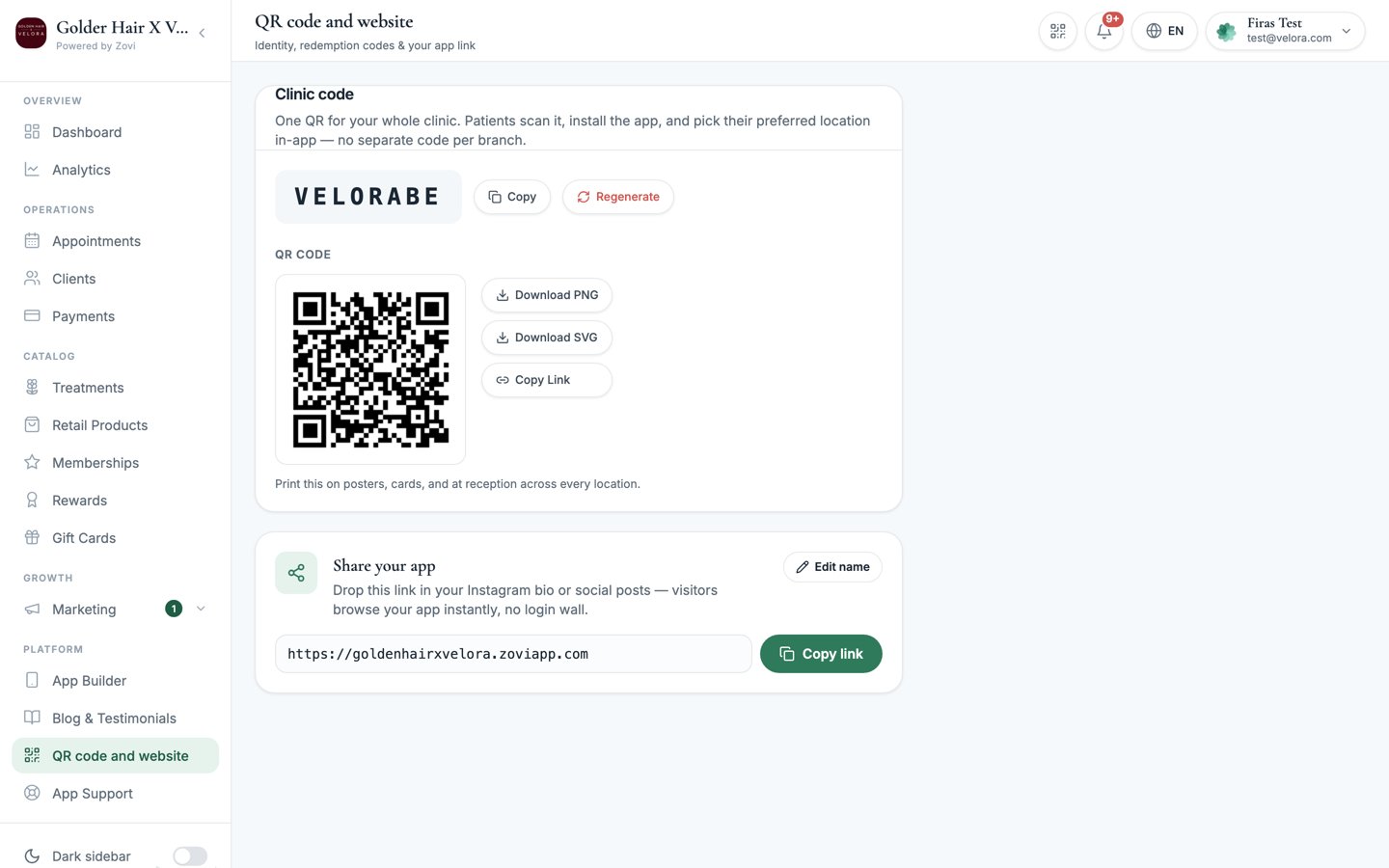 ## Join code
Your clinic has a short **join code**. This is the identifier baked into your
clinic's join link and QR.
* **Copy**: copy the code to share it.
* **Regenerate**: create a fresh code for your clinic.
**Regenerating your join code invalidates any codes you have already printed or
shared.** Old posters, cards, and QR stickers pointing at the previous code will
stop working. Only regenerate if you need to retire the old one, then download
and reprint the new QR.
## QR code
The **QR code** is the scannable version of your clinic's join link. A prospect
points their phone camera at it to install your app and join the clinic.
* **Download PNG**: a raster image, best for on-screen use and quick prints.
* **Download SVG**: a vector image that stays crisp at any size, best for large
prints, posters, and window decals.
* **Copy link**: copy the join URL to share digitally (email, social, messaging).
Print the QR at reception and on aftercare cards, and put the **Copy link**
version in your email signature and social bios.
## Share your app
Below the QR you get a **Share your app** card with a clinic-branded website link,
for example `https://.zoviapp.com`. Drop this link in your Instagram bio or
a social post, and visitors browse your app instantly with no login wall.
* **Copy link**: copy the website link to paste into a bio, post, or message.
* The **web name** is editable, so you can set the part before `.zoviapp.com` to
match your clinic.
Use the **Share your app** link anywhere a QR is awkward, such as a link in bio,
a story sticker, or a text message, so people can preview your app before they
install it.
## Not the check-in scanner
Keep the two QR tools straight:
A **join** code and app link you share so **new** clients can install your app
and join. One per clinic.
A scanner you use to check an **existing** client in, redeem a reward, or open
an order at the counter.
## Join code
Your clinic has a short **join code**. This is the identifier baked into your
clinic's join link and QR.
* **Copy**: copy the code to share it.
* **Regenerate**: create a fresh code for your clinic.
**Regenerating your join code invalidates any codes you have already printed or
shared.** Old posters, cards, and QR stickers pointing at the previous code will
stop working. Only regenerate if you need to retire the old one, then download
and reprint the new QR.
## QR code
The **QR code** is the scannable version of your clinic's join link. A prospect
points their phone camera at it to install your app and join the clinic.
* **Download PNG**: a raster image, best for on-screen use and quick prints.
* **Download SVG**: a vector image that stays crisp at any size, best for large
prints, posters, and window decals.
* **Copy link**: copy the join URL to share digitally (email, social, messaging).
Print the QR at reception and on aftercare cards, and put the **Copy link**
version in your email signature and social bios.
## Share your app
Below the QR you get a **Share your app** card with a clinic-branded website link,
for example `https://.zoviapp.com`. Drop this link in your Instagram bio or
a social post, and visitors browse your app instantly with no login wall.
* **Copy link**: copy the website link to paste into a bio, post, or message.
* The **web name** is editable, so you can set the part before `.zoviapp.com` to
match your clinic.
Use the **Share your app** link anywhere a QR is awkward, such as a link in bio,
a story sticker, or a text message, so people can preview your app before they
install it.
## Not the check-in scanner
Keep the two QR tools straight:
A **join** code and app link you share so **new** clients can install your app
and join. One per clinic.
A scanner you use to check an **existing** client in, redeem a reward, or open
an order at the counter.