> ## Documentation Index
> Fetch the complete documentation index at: https://zovi.mintlify.site/llms.txt
> Use this file to discover all available pages before exploring further.
# The client profile
> Everything about one client in one place: their status, contact details, appointments, purchases, memberships, rewards, offers, and full journey with your clinic.
The client profile is the complete record for one client. Open it by selecting a
client in the [Clients list](/clients/overview), or by choosing **View profile**
from their quick-actions menu. From here you can see their whole history with your
clinic and act on it.
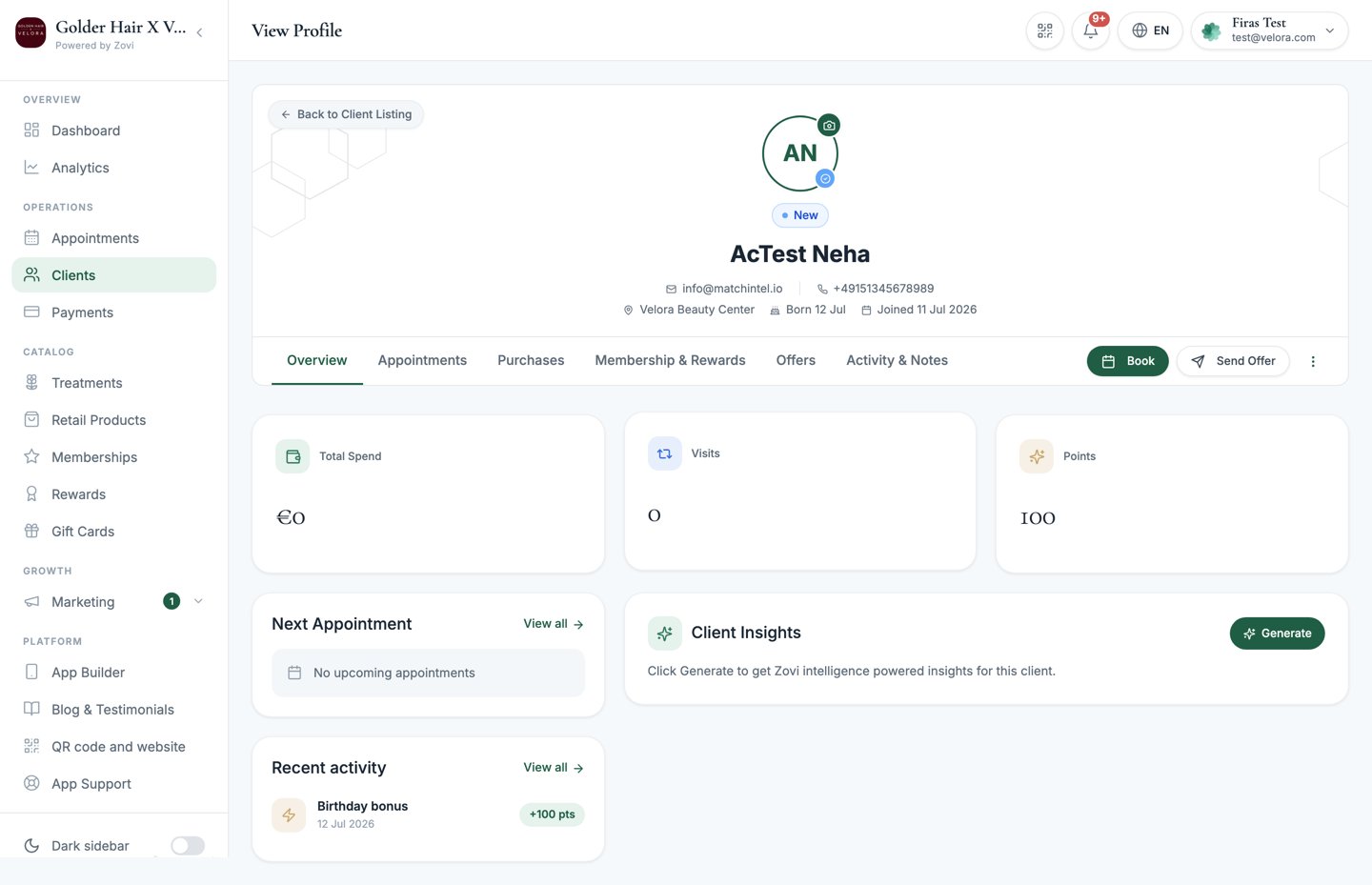 ## The hero
The top of the profile shows who the client is at a glance:
* **Status pill**: the client's lifecycle stage, one of `Active`, `New`, `At Risk`, or
`Churned`.
* **Membership pill**: the plan they're on, if any.
* **Contact details**: email, phone, location, date of birth, and when they
joined.
## Header actions
Next to the hero are the actions you'll reach for most:
| Action | What it does |
| -------------- | ------------------------------------------------------------------------------------------------------------ |
| **Book** | Start a new appointment with this client pre-selected. Opens the [calendar](/appointments/calendar). |
| **Send Offer** | Open the offer builder already targeted at this client. See [Offers & rewards](/clients/offers-and-rewards). |
| **More** (⋮) | The menu below. |
The **More** menu holds:
* **Custom Plan**: build a client-specific bundle for this client, with the
client already filled in. See [Custom plans](/clients/custom-plans).
* **Message Client**: send this client a message.
* **Send invite**: send a magic-link invite so they can install and join your app.
* **Edit Profile**: update the client's details.
* **Archive**: Coming soon. This option isn't functional yet.
## The six tabs
The profile is organised into six tabs. Here's what each one covers.
### Overview
Your at-a-glance summary of the client.
* **At-risk / churned banner**: if the client is slipping away, a banner appears
at the top with a **Send Win-Back Offer** button. See
[Offers & rewards](/clients/offers-and-rewards).
* **KPIs**: **Total Spend**, **Visits**, and **Points**.
* **Next Appointment**: their next booking, if any.
* **Membership**: a card showing their current plan.
* **Recent activity**: a short timeline of the latest things that happened.
* **Client Insights**: a lifecycle summary, churn risk, and a recommended next
step.
**Client Insights** is generated on demand. Select **Generate** to produce the
analysis rather than it updating automatically.
* **Charts**: **Spend per Order** and **Most Purchased Treatments** help you see
spending patterns at a glance.
## The hero
The top of the profile shows who the client is at a glance:
* **Status pill**: the client's lifecycle stage, one of `Active`, `New`, `At Risk`, or
`Churned`.
* **Membership pill**: the plan they're on, if any.
* **Contact details**: email, phone, location, date of birth, and when they
joined.
## Header actions
Next to the hero are the actions you'll reach for most:
| Action | What it does |
| -------------- | ------------------------------------------------------------------------------------------------------------ |
| **Book** | Start a new appointment with this client pre-selected. Opens the [calendar](/appointments/calendar). |
| **Send Offer** | Open the offer builder already targeted at this client. See [Offers & rewards](/clients/offers-and-rewards). |
| **More** (⋮) | The menu below. |
The **More** menu holds:
* **Custom Plan**: build a client-specific bundle for this client, with the
client already filled in. See [Custom plans](/clients/custom-plans).
* **Message Client**: send this client a message.
* **Send invite**: send a magic-link invite so they can install and join your app.
* **Edit Profile**: update the client's details.
* **Archive**: Coming soon. This option isn't functional yet.
## The six tabs
The profile is organised into six tabs. Here's what each one covers.
### Overview
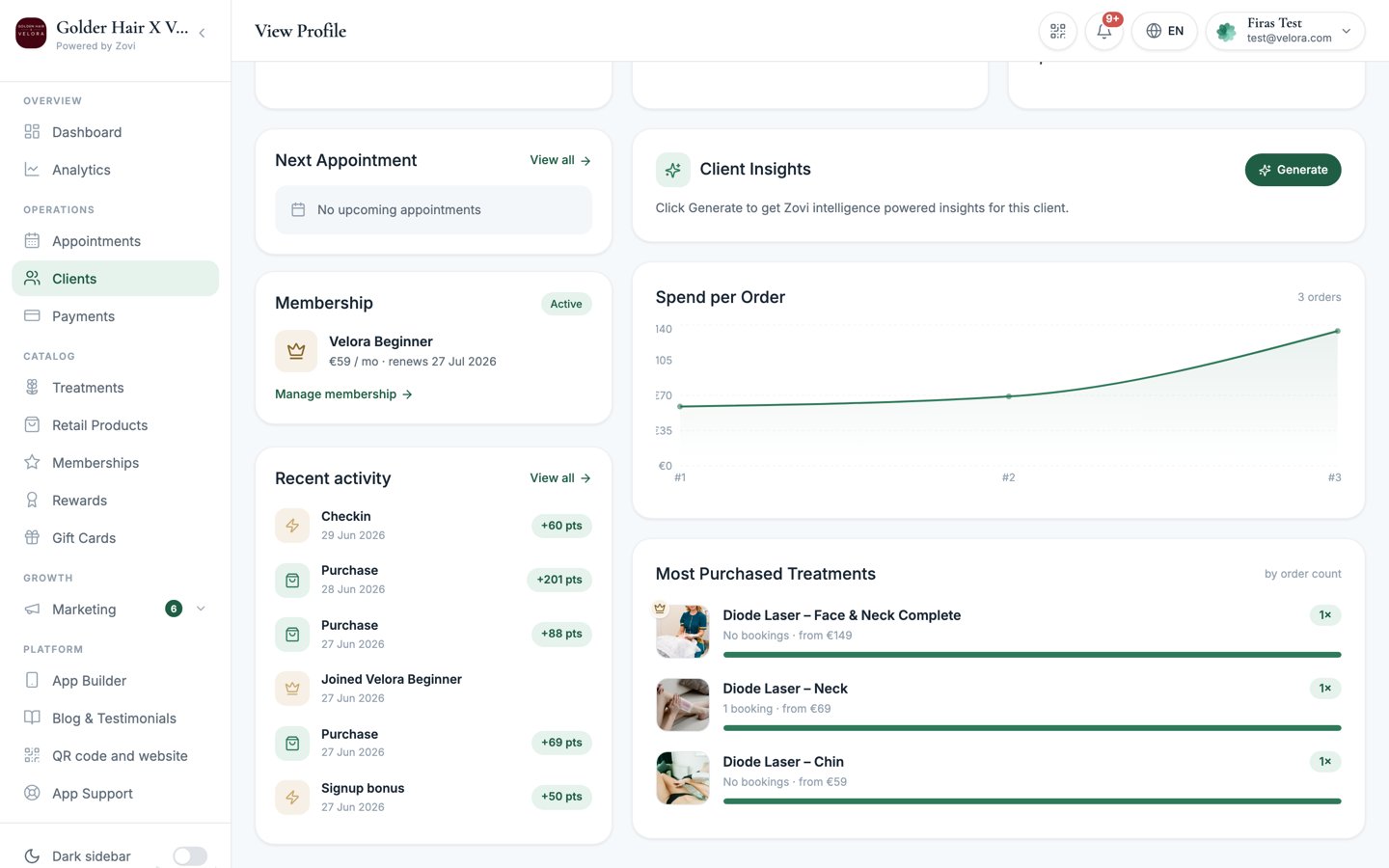
Your at-a-glance summary of the client.
* **At-risk / churned banner**: if the client is slipping away, a banner appears
at the top with a **Send Win-Back Offer** button. See
[Offers & rewards](/clients/offers-and-rewards).
* **KPIs**: **Total Spend**, **Visits**, and **Points**.
* **Next Appointment**: their next booking, if any.
* **Membership**: a card showing their current plan.
* **Recent activity**: a short timeline of the latest things that happened.
* **Client Insights**: a lifecycle summary, churn risk, and a recommended next
step.
**Client Insights** is generated on demand. Select **Generate** to produce the
analysis rather than it updating automatically.
* **Charts**: **Spend per Order** and **Most Purchased Treatments** help you see
spending patterns at a glance.
 ### Appointments
Every booking for this client, both **upcoming** and **past**, with each one's
status: `Completed`, `Confirmed`, `Pending`, `Cancelled`, or `No-show`. Select
**Book appointment** to add a new one. See the
[appointments calendar](/appointments/calendar) for how bookings work.
### Purchases
The client's spending and orders:
* **Total Spend**, **Transactions**, and **Average** order value.
* An **Orders** table. Select any order to open its detail.
* **Payment history** for the client.
### Membership & Rewards
The client's loyalty and membership home.
* **Loyalty tier**: a banner showing their current tier and progress toward the next.
* **Rewards journey**: a timeline showing where they are, with each goal marked
**Unlocked**, **Active goal** (with a "You are here" marker), or **Locked**.
* **Active reward goals**: the rewards they're currently working toward.
* **Membership card**: with **Pause** and **Cancel** controls, and the slots
**included this period**. A cancellation can be refused, usually because the
member is still inside their minimum commitment period. The message tells you
why and gives the date that period ends.
* **Claimed credits**: each credit the member has claimed has a **+ / -**
stepper, so you can correct how many sessions have been used.
* **Points Balance** and **Adjust Points**: manually add or remove points. Every
adjustment writes a staff audit record naming who made the change. See
[Offers & rewards](/clients/offers-and-rewards#give-or-adjust-points-and-rewards).
* **Discount Benefits**: the discounts the client is entitled to.
* **Reward History**: past rewards, each marked `Unlocked`, `Redeemed`, `Banked`,
or `Expired`.
Use the **+ / -** stepper when a session was delivered but never scanned, or
scanned twice. The credit flips between active and used on its own as you adjust
it. An expired credit can't be revived.
Every credit adjustment is recorded against the staff member who made it, with
the old and the new figures. It's an audited correction, not a silent edit.
To give a client a reward or fix a points balance, use **Adjust Points** here.
It's the single place to change points by hand. See
[Give or adjust points and rewards](/clients/offers-and-rewards#give-or-adjust-points-and-rewards).
### Offers
A history of every offer this client has received, in a table showing the
**offer**, its **source**, when it was **received**, its **status**, and the
**outcome**.
* **Source** can be `Manual`, `Automation`, `Zovi Intelligence`, or `Birthday`.
* **Status** can be `Delivered`, `Redeemed`, `Expired`, `Suppressed`, or `Skipped`.
To send this client a new offer, use **Send Offer** in the header. See
[Offers & rewards](/clients/offers-and-rewards).
### Activity & Notes
The client's full timeline plus your internal record-keeping.
* **Timeline**: the client journey, every meaningful event in order.
* **Add internal note**: jot down notes for your team. These are internal and
aren't shown to the client.
* **Communications log**: every push and email sent to the client, each marked
`Sent`, `Delivered`, `Failed`, or `Skipped`.
**The client journey** is how you follow a client's whole story with your
clinic. It isn't a single screen. It's spread across three places: the
**timeline** on this **Activity & Notes** tab, the **Recent activity** feed on
the **Overview** tab, and the **Rewards journey** on the **Membership &
Rewards** tab. Together they show what the client did, what you sent them, and
where they are in your loyalty program.
## Related tasks
Build a client-specific bundle of treatments and products.
Target this client with an offer, or adjust their points.
### Appointments
Every booking for this client, both **upcoming** and **past**, with each one's
status: `Completed`, `Confirmed`, `Pending`, `Cancelled`, or `No-show`. Select
**Book appointment** to add a new one. See the
[appointments calendar](/appointments/calendar) for how bookings work.
### Purchases
The client's spending and orders:
* **Total Spend**, **Transactions**, and **Average** order value.
* An **Orders** table. Select any order to open its detail.
* **Payment history** for the client.
### Membership & Rewards
The client's loyalty and membership home.
* **Loyalty tier**: a banner showing their current tier and progress toward the next.
* **Rewards journey**: a timeline showing where they are, with each goal marked
**Unlocked**, **Active goal** (with a "You are here" marker), or **Locked**.
* **Active reward goals**: the rewards they're currently working toward.
* **Membership card**: with **Pause** and **Cancel** controls, and the slots
**included this period**. A cancellation can be refused, usually because the
member is still inside their minimum commitment period. The message tells you
why and gives the date that period ends.
* **Claimed credits**: each credit the member has claimed has a **+ / -**
stepper, so you can correct how many sessions have been used.
* **Points Balance** and **Adjust Points**: manually add or remove points. Every
adjustment writes a staff audit record naming who made the change. See
[Offers & rewards](/clients/offers-and-rewards#give-or-adjust-points-and-rewards).
* **Discount Benefits**: the discounts the client is entitled to.
* **Reward History**: past rewards, each marked `Unlocked`, `Redeemed`, `Banked`,
or `Expired`.
Use the **+ / -** stepper when a session was delivered but never scanned, or
scanned twice. The credit flips between active and used on its own as you adjust
it. An expired credit can't be revived.
Every credit adjustment is recorded against the staff member who made it, with
the old and the new figures. It's an audited correction, not a silent edit.
To give a client a reward or fix a points balance, use **Adjust Points** here.
It's the single place to change points by hand. See
[Give or adjust points and rewards](/clients/offers-and-rewards#give-or-adjust-points-and-rewards).
### Offers
A history of every offer this client has received, in a table showing the
**offer**, its **source**, when it was **received**, its **status**, and the
**outcome**.
* **Source** can be `Manual`, `Automation`, `Zovi Intelligence`, or `Birthday`.
* **Status** can be `Delivered`, `Redeemed`, `Expired`, `Suppressed`, or `Skipped`.
To send this client a new offer, use **Send Offer** in the header. See
[Offers & rewards](/clients/offers-and-rewards).
### Activity & Notes
The client's full timeline plus your internal record-keeping.
* **Timeline**: the client journey, every meaningful event in order.
* **Add internal note**: jot down notes for your team. These are internal and
aren't shown to the client.
* **Communications log**: every push and email sent to the client, each marked
`Sent`, `Delivered`, `Failed`, or `Skipped`.
**The client journey** is how you follow a client's whole story with your
clinic. It isn't a single screen. It's spread across three places: the
**timeline** on this **Activity & Notes** tab, the **Recent activity** feed on
the **Overview** tab, and the **Rewards journey** on the **Membership &
Rewards** tab. Together they show what the client did, what you sent them, and
where they are in your loyalty program.
## Related tasks
Build a client-specific bundle of treatments and products.
Target this client with an offer, or adjust their points.