> ## Documentation Index
> Fetch the complete documentation index at: https://zovi.mintlify.site/llms.txt
> Use this file to discover all available pages before exploring further.
# Automatic offers
> Set up Birthday, Anniversary and Lapsed Member offers once and let them run on their own, with no per-offer approval needed.
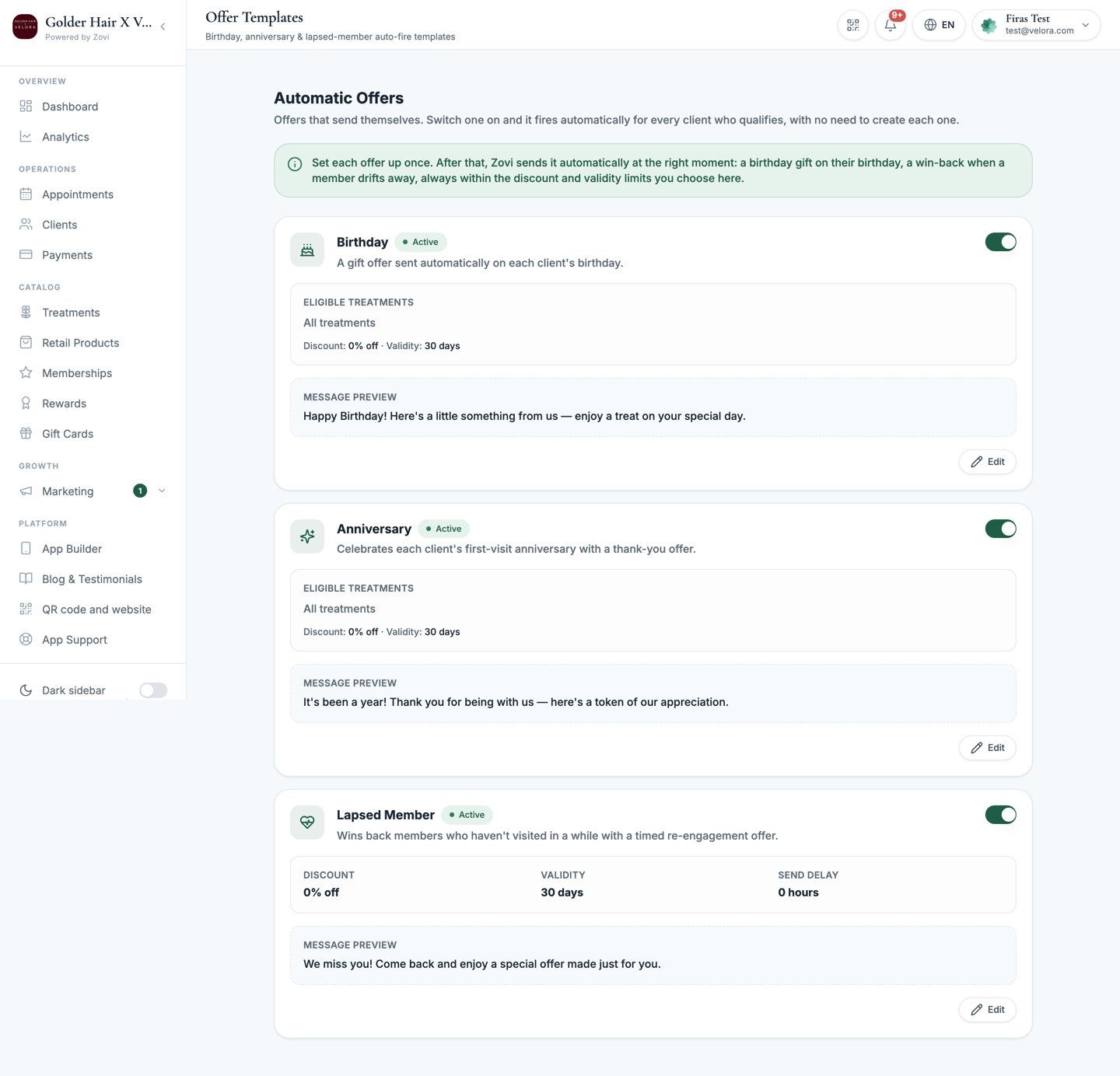
**Automatic Offers** are your always-on offers. Find them at **Marketing → Offers →
Automatic Offers**, the fourth tab on the Offers page alongside **Approvals**, **Live
Offers** and **Offer History**.
Unlike everything else in Marketing, an automatic offer you switch on fires
**without a per-offer approval** each time. You approve the rules once, and Zovi
sends the offer automatically whenever a client qualifies.
Automatic Offers are the **only** paths that fire without per-offer approval. Every
other offer still waits in the [Approvals inbox](/marketing/offers) until you
approve it. Set these discounts carefully, because they go out on their own.
Like the rest of the Offers suite, automatic offer discounts are capped by your
[Loyalty Engine](/settings/loyalty-engine) guardrails.
## The three automatic offers
A treat sent around each client's birthday.
Marks the anniversary of a client joining or their first visit.
Wins back a member who has gone quiet.
 ## What you configure
All three share an on/off switch, a **validity** window, and **message copy** in
**English** and **Deutsch**. Beyond that they differ, because they do different jobs.
### Birthday and Anniversary
| Setting | What it does |
| --------------------------- | ---------------------------------------------------------------------------------------------- |
| **On / off** | Switches the automation on. While off, nothing sends. |
| **Discount type and value** | Choose **Percentage off** or **Amount off**, then set the value (capped by your guardrails). |
| **Validity** | How long the offer stays valid once the client receives it. |
| **Eligible treatments** | The pool of treatments the offer can be redeemed against. Leave it empty to allow all of them. |
| **Message copy** | The wording the client sees, in **English** and **Deutsch**. |
These two have no send delay at all.
### Lapsed Member
This one wins back a member who cancelled, so it discounts the **membership price**,
not a treatment.
| Setting | What it does |
| --------------------------- | ------------------------------------------------------------------------------------------------------------------------------------------------------------------------ |
| **On / off** | Switches the automation on. While off, nothing sends. |
| **Discount** | Always a **percentage** off the membership price, and the type is fixed. |
| **Validity** | How long the offer stays valid once the client receives it. |
| **Send delay** | Not editable. It always sends 24 to 48 hours after the cancellation, at a randomised moment inside that window, so a batch of cancellations does not all go out at once. |
| **Membership reactivation** | How many months the discounted membership price lasts if the client re-subscribes: `1`, `2`, `3` or `6`. After that it reverts to full price. |
| **Message copy** | The wording the client sees, in **English** and **Deutsch**. |
There is no eligible-treatments pool here, because the discount applies to the
membership itself.
To stop the Lapsed Member offer sending, switch it off. You cannot delay
or pause it any other way.
## Set up an automatic offer
Go to **Marketing → Offers → Automatic Offers**, then choose **Birthday**,
**Anniversary**, or **Lapsed Member**.
Choose the reward. Keep it within your [Loyalty
Engine](/settings/loyalty-engine) limits. The offer will not exceed the maximum
discount you allow.
Set how long the offer stays valid, then fill in whichever remaining settings
this automatic offer has.
Fill in the **English** and **Deutsch** copy. Each client sees the wording for
their language.
Turn it **on**. From now on it sends automatically whenever a client
qualifies, with no approval step.
Because these run unattended, review their performance periodically in **Campaign
analytics** and adjust the discount or copy as you learn what works.
## Related
Everything else, where offers wait for your approval before they send.
Owners set the caps that automatic offers must stay within.
## What you configure
All three share an on/off switch, a **validity** window, and **message copy** in
**English** and **Deutsch**. Beyond that they differ, because they do different jobs.
### Birthday and Anniversary
| Setting | What it does |
| --------------------------- | ---------------------------------------------------------------------------------------------- |
| **On / off** | Switches the automation on. While off, nothing sends. |
| **Discount type and value** | Choose **Percentage off** or **Amount off**, then set the value (capped by your guardrails). |
| **Validity** | How long the offer stays valid once the client receives it. |
| **Eligible treatments** | The pool of treatments the offer can be redeemed against. Leave it empty to allow all of them. |
| **Message copy** | The wording the client sees, in **English** and **Deutsch**. |
These two have no send delay at all.
### Lapsed Member
This one wins back a member who cancelled, so it discounts the **membership price**,
not a treatment.
| Setting | What it does |
| --------------------------- | ------------------------------------------------------------------------------------------------------------------------------------------------------------------------ |
| **On / off** | Switches the automation on. While off, nothing sends. |
| **Discount** | Always a **percentage** off the membership price, and the type is fixed. |
| **Validity** | How long the offer stays valid once the client receives it. |
| **Send delay** | Not editable. It always sends 24 to 48 hours after the cancellation, at a randomised moment inside that window, so a batch of cancellations does not all go out at once. |
| **Membership reactivation** | How many months the discounted membership price lasts if the client re-subscribes: `1`, `2`, `3` or `6`. After that it reverts to full price. |
| **Message copy** | The wording the client sees, in **English** and **Deutsch**. |
There is no eligible-treatments pool here, because the discount applies to the
membership itself.
To stop the Lapsed Member offer sending, switch it off. You cannot delay
or pause it any other way.
## Set up an automatic offer
Go to **Marketing → Offers → Automatic Offers**, then choose **Birthday**,
**Anniversary**, or **Lapsed Member**.
Choose the reward. Keep it within your [Loyalty
Engine](/settings/loyalty-engine) limits. The offer will not exceed the maximum
discount you allow.
Set how long the offer stays valid, then fill in whichever remaining settings
this automatic offer has.
Fill in the **English** and **Deutsch** copy. Each client sees the wording for
their language.
Turn it **on**. From now on it sends automatically whenever a client
qualifies, with no approval step.
Because these run unattended, review their performance periodically in **Campaign
analytics** and adjust the discount or copy as you learn what works.
## Related
Everything else, where offers wait for your approval before they send.
Owners set the caps that automatic offers must stay within.