

The Offers suite (offers, flash deals, scratch cards, and promo codes) is
available to your clinic. There is nothing extra to switch on.
What’s in Marketing
The Marketing section groups several areas. Where you start depends on what you want to do.
Two more growth areas sit directly in the sidebar rather than under Marketing,
because they have their own access permissions:
- Referrals: your clients invite friends by link, and both sides are rewarded when the friend pays for a first order.
- Deliverability: your email sending domain, its warm-up, and your sending reputation.
Offers & promo codes
Approve suggested offers, create promotions and promo codes, and track what’s
live.
Automatic offers
Set up Birthday, Anniversary, and Lapsed Member offers that run on their own.
Referrals
Let clients invite friends, and reward both sides when the friend turns up and
pays.
The approval inbox: nothing goes out until you approve it
The most important idea in Marketing is the approval inbox. Offers can be suggested from many sources, including Zovi Intelligence, the Smart Offers AI, but a suggestion is only ever a proposal. No offer reaches a client until you approve it.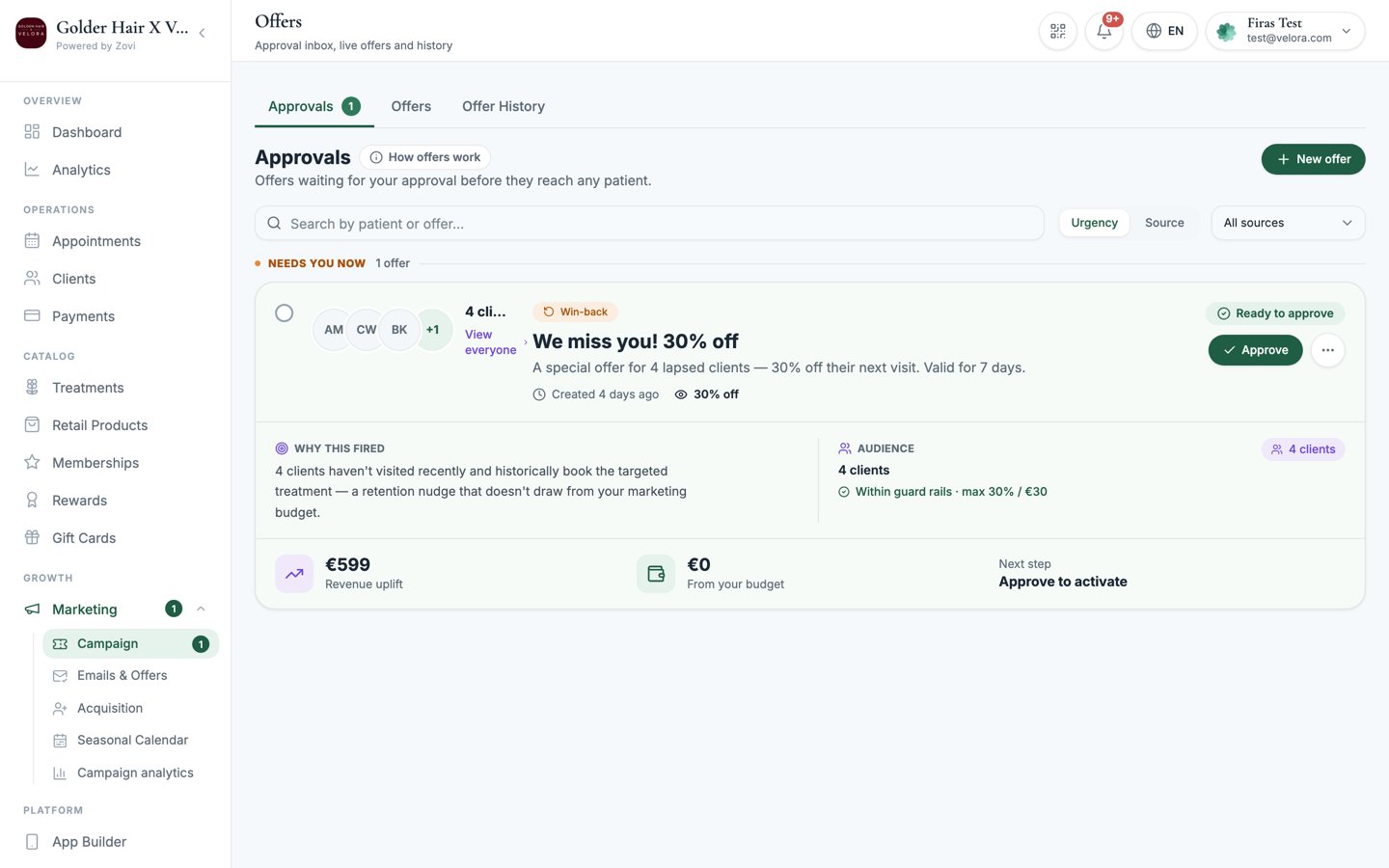
Screenshot: the Offers Approvals inbox with pending offer cards, each showing 'Why this fired' and a 'Within guard rails' chip, plus Approve and Reject buttons.
The one exception is Automatic Offers. Once you switch one on, it fires
without a per-offer approval each time. That’s the trade-off for setting them up
once. See Automatic offers.
Discounts are capped by your guardrails
Every offer, promotion, and promo code you create is capped by the limits set in your Loyalty Engine: your maximum discount percentage, maximum automated discount amount, and monthly offer budget. This is why suggested offers show a “Within guard rails” chip in the approval inbox: it confirms the discount stays inside the limits you set.Discount limits are configured in Settings, then Loyalty
Engine, which is owner-only. If an offer needs a
bigger discount than your guardrails allow, an owner has to raise the limit
first.
Smart Offers with Zovi Intelligence
Zovi Intelligence watches your clinic’s activity and suggests offers for you to approve: win-backs for lapsed clients, nudges for clients who’ve stalled, and more. Suggestions land in the approval inbox with a purple badge and always stay within your guardrails.Zovi Intelligence needs a warming period of about 14 days before it starts
suggesting offers, so it can learn your clinic’s patterns.
Text messages come from your clinic
When your clinic sends a text message, whether that’s a verification code during sign-up or a marketing message, it arrives under your own brand name rather than an unfamiliar number. There is nothing to set up. The name comes from your clinic brand name automatically, shortened to letters and numbers only, up to 11 characters, so “Bellevue Clinic” arrives as “BellevueCl”.This works in Germany today with no setup. In Switzerland, mobile networks do not
support sender names, so Swiss clients see a plain number instead and nothing can
change that. In Austria, sender names have to be pre-registered with the networks,
which takes several weeks, so until that is in place Austrian clients also see a
plain number. Messages still arrive normally either way.
Where to go next
Create your first offer
Walk through building a promotion or a promo code.
Send an offer to one client
Target a single client from their profile.