

Setting up and editing a referral programme is owner-only. Managers and staff
who can open the page see it read-only, with the fields disabled.
- Rewards are a cash value in your own currency, not points.
- The person doing the referring is paid only when their friend pays for a first order. The friend’s own reward is issued as soon as they sign up, so a friend who joins and never buys still counts towards your cost.
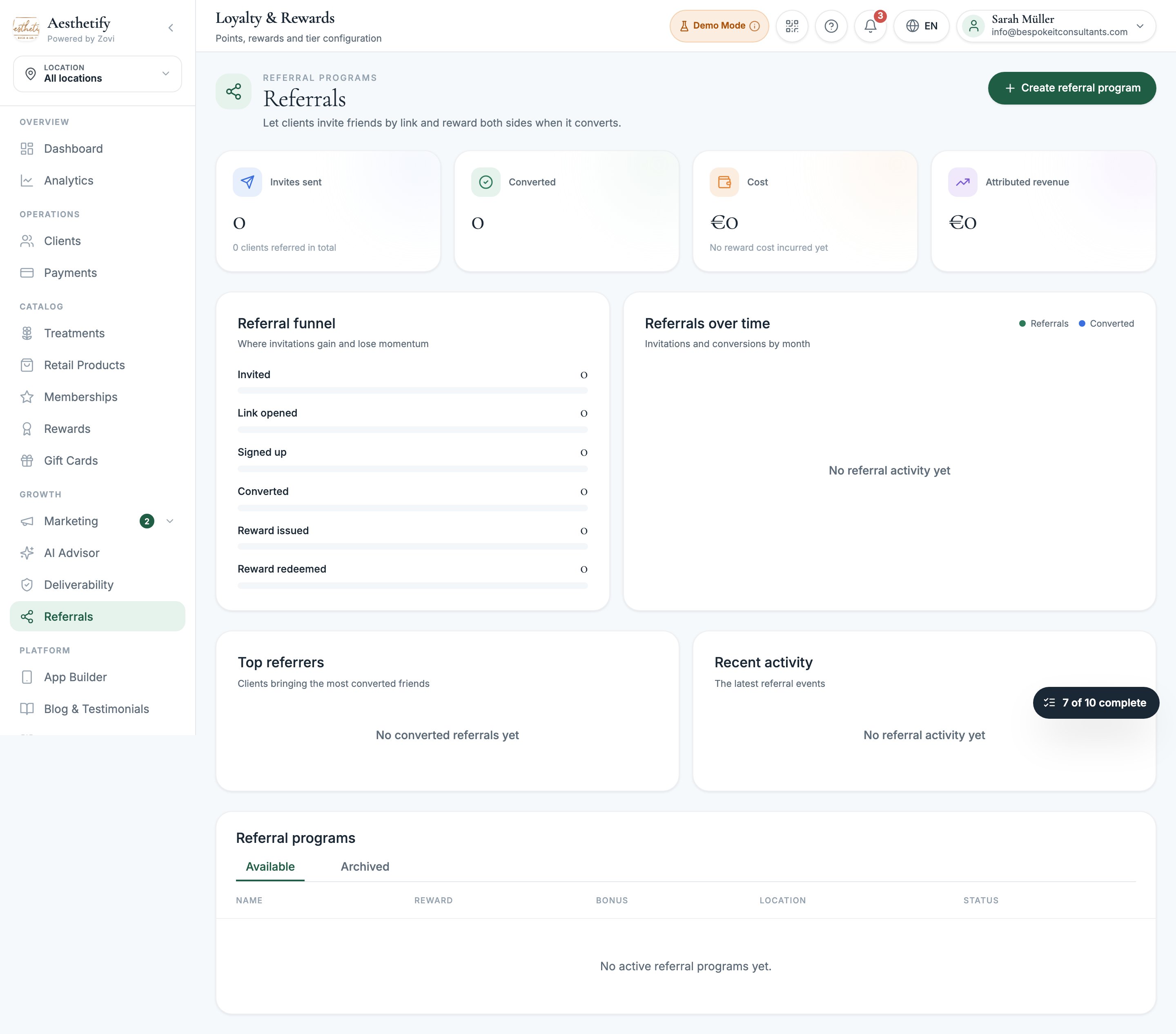
Screenshot: the Referrals page with the summary tiles, funnel, and the list of referral programs.
Set up your first program
1
Open Referrals
Select Referrals in the sidebar, then Create referral program.
2
Name it and choose where it applies
Give it a name, then set it to all locations or pick specific ones.
3
Set the two rewards
Set the sender reward (for your client) and the friend’s reward (for
the person they invite). They are configured completely independently.
4
Add a bonus, if you want one
Turn on Reward your biggest fans to pay extra to clients who refer several
friends.
5
Set your limits
Set the send limit and how long an invite link stays valid.
6
Set up the landing page
Choose what the friend sees when they open the link, then save.
The sender reward and the friend’s reward
Each reward has its own settings:A minimum spend is required on both rewards so that a small basket cannot be paid
for entirely by the reward. If you set a minimum spend of less than twice the
reward amount, you will see a warning. That is a nudge, not a block.
Reward your biggest fans
An optional bonus for clients who keep bringing people in: refer a set number of friends inside a rolling window of months, and earn a larger bonus on top of the individual rewards. You can make the bonus bankable as cash and choose whether it carries a minimum spend of its own.When the bonus is on, its own count and window replace the send limit.
Completing the bonus resets the counter, so an advocate is never locked out at
the exact moment you want to reward them.
Link validity
Invite links are valid for 90 days by default.Your landing page
The landing page is what a friend sees when they open the link. By default it shows whatever the friend’s reward applies to. You can instead feature specific treatments and retail products, up to six cards, and add a share image (1200 by 630 pixels, under 600 KB). If you do not add one, Zovi generates a branded card so the link still previews properly when it is shared.One active program per location
You can run several programs, but only one active program may cover any given location.- A program for one location conflicts with a program covering all locations.
- Two programs covering two different single locations do not conflict.
What your clients see
A referral banner appears on Home, Shop, and Rewards, in both the app and the web app. Tapping Refer a Friend immediately creates a fresh single-use link and opens their share sheet. There is no form and no friend’s name to type in. The friend opens a landing page in your branding, personalised with the sender’s first name, which previews properly on WhatsApp, iMessage, and similar. They then sign up, with two differences from the normal journey: a phone number is required and verified by SMS code, and the Google and Apple sign-in buttons are hidden, because neither gives us a verified phone number. Their reward unlocks straight away and is celebrated on screen. The sender’s reward is credited when their friend pays for their first order, and that moment is celebrated too, as is hitting the bonus. Under Track Referrals they see one row per invite showing where it has got to: still waiting, signed up, or converted. Clients get a push notification when their friend joins, when their reward is credited, and when they unlock the bonus. The friend gets a reminder seven days before their reward expires.Reading your referral numbers
The top of the page shows invites sent, converted, cost, and attributed revenue, followed by a funnel, a Referrals over time trend, Top referrers, and a Recent activity feed.Attributed revenue here counts the friend’s first order only, the one that
earns the sender their reward. For the lifetime revenue of everyone who joined
through a referral, which keeps growing as those clients come back, use the
Referrals tab in Analytics. Both are correct, and
they answer different questions: use this one to see what a reward costs you,
and the lifetime one to decide whether the programme is worth running.
Someone who was already your client is left out of the acquisition totals but
still appears in the funnel, because the link genuinely was shared and opened.
Rules and limits
Nobody can refer themselves
Nobody can refer themselves
Self-referral is blocked.
Existing clients do not earn the friend's reward
Existing clients do not earn the friend's reward
Someone who is already a client of your clinic can still create an account
through the link, but the reward is withheld.
One reward per link
One reward per link
A link earns its reward once. If somebody uses a link that has already been
claimed, or one that has passed its validity window, they can still create an
account, but no referral is recorded and no reward is issued. Worth knowing
when a client tells you their friend signed up but nothing arrived.
A full refund claws the reward back
A full refund claws the reward back
If the friend’s first order is refunded in full, the sender’s reward is
reversed, as long as it has not been used yet. A partial refund changes
nothing, and a reward the sender has already redeemed or banked is left alone.
Managing programs
Each row offers Edit, Duplicate, and Archive, and archived programs live on their own tab. Archiving a program never breaks invitations that are already in flight.Related
Loyalty & rewards
Points, rewards, and the welcome gift.
Offers
Approvals, live offers, and automatic offers.
Client offers & rewards
What a single client has been given.
Marketing overview
Everything in the Marketing area.